
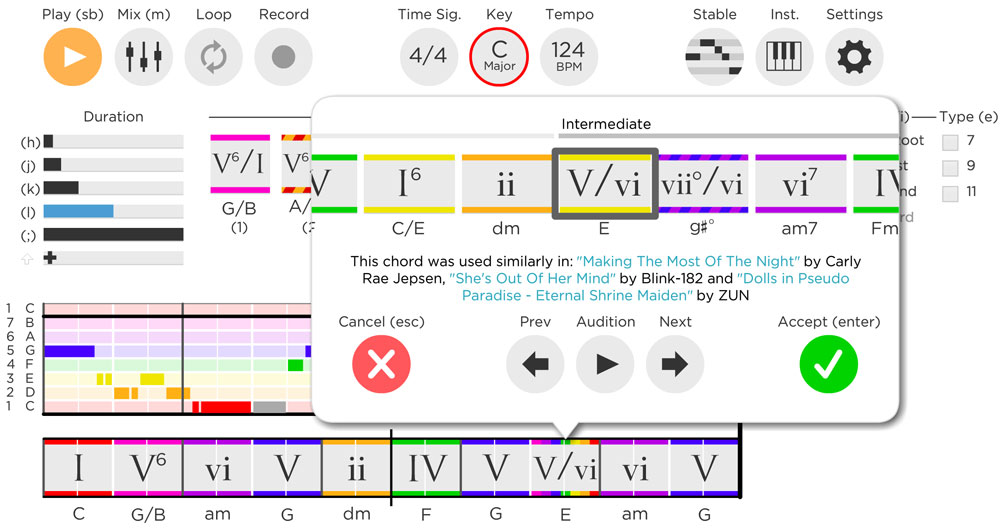
Do you want to instantly understand how a song works harmonically…
…and apply that knowledge to your own songwriting?
In my journey to understand music theory and make better music, I found the website Hooktheory.
I’ve always struggled to create music with my limited knowledge of theory. It isn’t for lack of trying. I worked through college music theory textbooks and I always ended up trying to figure out how any of it would apply to my songwriting or production.
I eventually started sketching my musical ideas in their songwriting software, Hookpad.
It made it easy to get ideas down and it broadened them, mostly by helping me out of boxes I had built for myself.
I’ve been using it since 2020, and I still open Hookpad before I open my DAW when I have an idea worth chasing.
Here’s what it does, what it actually costs, and the one part of it I wouldn’t pay for.
What is Hookpad?
Hookpad is a musical sketchpad that helps you create chord progressions and melody with the essential music theory built in. It is backed by a database of analyzed songs, so it can give you melody and chord suggestions when you get stuck or want to think outside the box.
Hooktheory puts that database at over 75,000 songs. The counter on their homepage was showing 80,111 when I checked in September 2026.
It was created by three UC Berkeley PhD students: Dave Carlton, Ryan Miyakawa and Chris Anderson. They taught a songwriting course at Berkeley in 2011, it went well, and they built a platform around it. Hooktheory went through Berkeley’s SkyDeck incubator in 2013.
Hookpad is not the only product they make. There’s a whole set of music theory educational products around it.
- TheoryTab: the free database of songs that have had their chords and melody analyzed. Now over 75,000.
- Hooktheory Books: a music theory book unlike any other, with audiovisual examples from modern songs. Book I is $14.99, Book II is $19.99.
- Chord Crush: an ear training game built on the same song database, with its own separate subscription.
- Aria: the generative AI add-on for Hookpad, launched in 2024. More on this below, because it is the one thing here I would tell you to skip.
Who is Hookpad for?
Hookpad makes songwriting approachable for beginners and has enough depth that experienced songwriters still get something out of it. If you’re a songwriter, musician or producer, it is worth a place in your kit.
Beginners and Songwriting Novices
For beginners, the biggest barrier to writing songs is music theory. Hookpad builds the concepts into the tool, so you don’t have the fear of making a mistake or getting overwhelmed by options.
By default it shows only the notes and chords in the song’s key, colored by their function in the scale.
So if you don’t yet know what makes a good chord progression, Hookpad shows you which chords work with what you already have, and suggests where to go next. There’s melody guidance too, to help you figure out what will sound good over each chord.
If you want the theory behind why those colors work the way they do, start with how to learn music theory and the most common chord progression.
Experienced and Professional Songwriters
For experienced songwriters, Hookpad is a fast way to audition ideas and hear them in several styles in a few clicks.
A lot of the other songwriting software I have tried is clunky about note entry and chord building. Hookpad’s keyboard shortcuts get out of the way once you learn them.
It also handles the things that make simpler tools feel limiting: pickup notes, key changes, time signature changes, borrowed chords. Mostly your creativity is the limit.
Overview of Features
Hookpad comes packed with useful features that will help you in your songwriting journey.
Songwriting toolset
- Chord Palette: no more blindly guessing chords through trial and error. Hookpad groups the chords that work in a key, and a couple of clicks gets you a progression that sounds good. Advanced users are not boxed in; you can still use any chord you want.
- Melody Guides: once you have chords down, Hookpad highlights which notes belong to each chord, so you can see which will sit stable and which will sound dissonant.
- Sparks: short musical starting points with instruments, tempo and meter already set for a genre. This is the blank-page fix.
- Song Templates: 11 full band templates with verse, chorus and bridge sections already laid out and mixed.
Large Virtual Instrument Library
500+ instruments, not just a piano
Tired of the default piano sound? Hookpad ships over 500 instruments across leads, harmony, guitar, bass and drums, covering a wide range of genres.
You don’t have to wait until a track is fully arranged to hear where it is going. Hookpad gives you a glimpse in a few clicks.
I wrote one chord progression and melody and auditioned it as EDM, as rock, and as jazz. Hearing the same melody arranged that many ways that fast was genuinely useful. I made better decisions once I pulled it into my DAW to actually produce it.
Here’s their sound library demo.
A searchable database of 75,000 songs
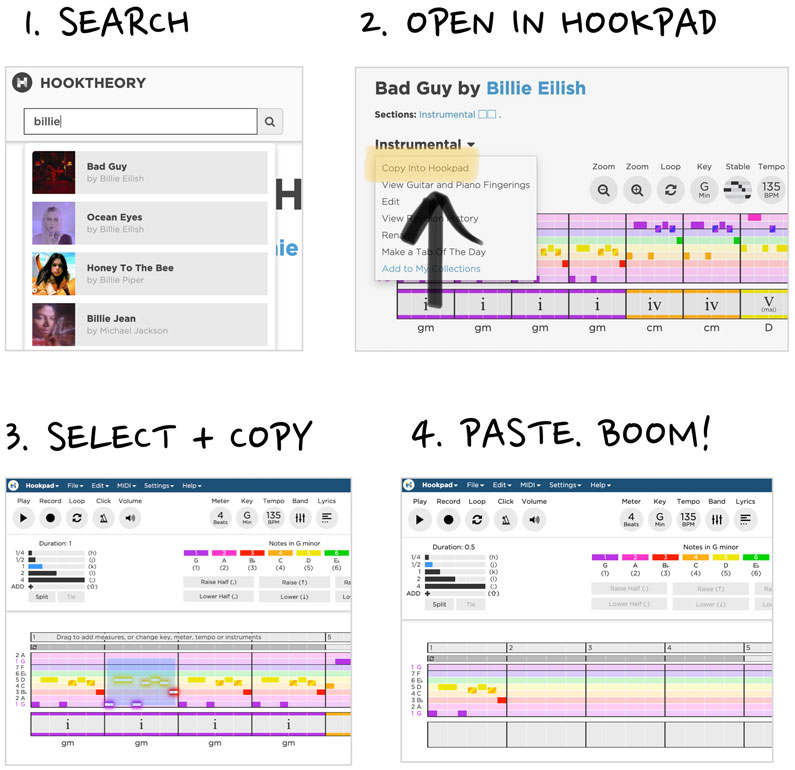
The best thing in the Hooktheory ecosystem is still free: searching the chords and melodies of over 75,000 songs analyzed by the user community.
I use this constantly. I hear a song I like, I want to know why the chorus does what it does, so I find it on TheoryTab, copy it into Hookpad, and take it apart.
TheoryTab also shows guitar chord charts alongside the analysis, which helps if you’re working things out on a guitar rather than a keyboard.
Export Functions
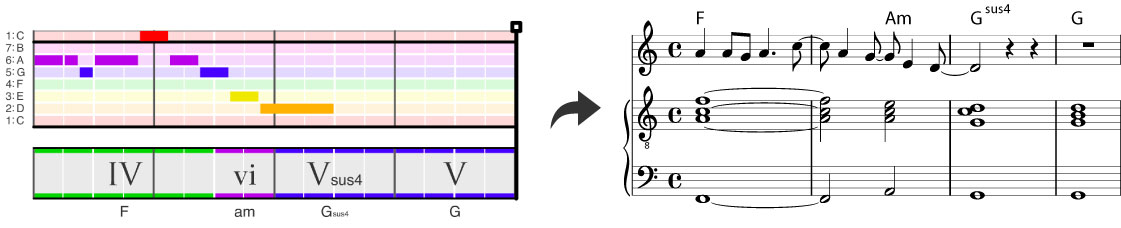

Collaboration is a normal part of modern songwriting. Most hit songs are written by several people, so you need to hand your ideas over quickly.
Hookpad lets you share in whatever format the other person reads: guitar tab or sheet music. Export the tab for your guitarist and the sheet music for your keyboard player, and everyone is on the same page.
There’s also a track stems option that downloads each instrument as a separate file in a zip. That’s the one I use most, because stems drop straight into a session. Lyrics export as their own PDF sheet.
Magic Chord
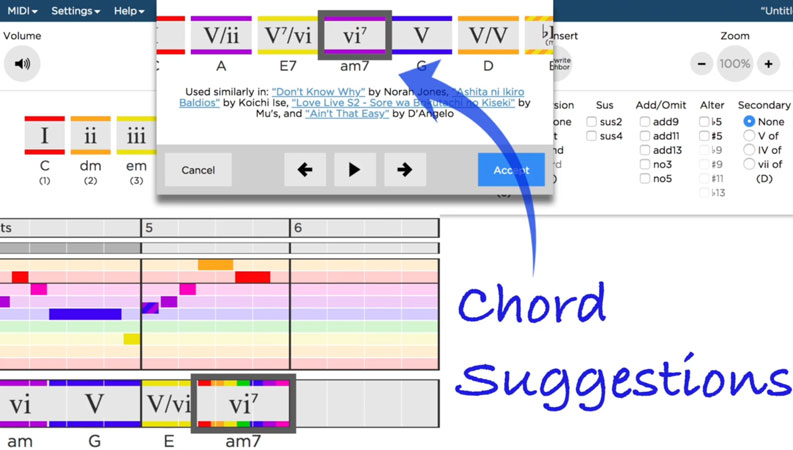
If you are looking for inspiration for something new or you just happen to be stuck with your chord progression. Hookpad offers a solution through its Magic Chord feature.
It’s worth being clear about what this is. Magic Chord is not AI generation. It’s a statistical lookup against 75,000 analyzed songs, and that’s exactly why I trust it. The suggestions come from records of what real songs actually did.
Drag and drop to your DAW
Starting the songwriting process inside your DAW is hard, because the DAW offers a hundred things that have nothing to do with writing.
I can’t tell you how many times I’ve sat down to write a song and lost an hour to finding the right synth patch. Better discipline helps. Hookpad helps more.
You can drag MIDI chord progressions, basslines, melodies and drum tracks from Hookpad straight into your DAW, with dozens of rhythm patterns to pick from. I write the core of the song, then take it in and tweak the arrangement. I’ve been more productive since I started working that way.
MIDI export attaches program change messages and labels each track, so the parts land in your DAW already named instead of arriving as four identical blobs.
If you want the drums to sound like something other than a preset, learning drum programming by recreating songs pairs well with this workflow.
Advanced Songwriting Features
f you’re an experienced songwriter, composer or producer, the screenshots might make Hookpad look limiting. You’ve probably got questions like:
Can I use non-diatonic notes?
Can I add borrowed chords?
Can I change key for the verse or the chorus?
The answer to all of these is yes.
The people at Hooktheory had songwriters in mind when they built this. In six years of using it I haven’t hit a wall that stopped an idea.
HookTheory Platform
Hookpad is just one aspect of the platform that the people behind HookTheory have created. There is an entire ecosystem that revolves around music education and creativity that they have inspired.
- Hooktheory Books: They have created a modern solution to learning music theory that isn’t bogged down like the more traditional music theory textbooks. it contains audiovisual examples of modern songs to help the modern songwriter advance their songwriting skills. At the fraction of the cost of a college music theory textbook.
- Theorytab: This is the modern version of a guitar tab, but with the benefit of showing the music theory behind it so you can understand how it is constructed. There is a database of over 13,000 songs created by the community at Hooktheory. It shows the melody and chord progression of the song while playing back in time with the actual recording. It has helped me take my music theory knowledge to the next level. The best thing is that it is completely free!
How to use Hookpad
Hookpad is actually extremely easy to use and the starter version is completely free to use with only some limitations.
Go Here and Click “TRY FOR FREE”
Once you do that follow along with the video to get an understanding of the basic functions. Even though it is in the browser, it makes use of keyboard shortcuts and feels very intuitive.
To create a chord progression, click on the chord regions (the smaller rows with the roman numerals). You can use the keyboard (1-7) to add in the corresponding chord number. There are also options such as:
- Magic Chord
- Search TheoryTab
- Use Premade progressions
- Search and view the most popular progressions
- Bass Sets (Various chord options based on the bass note of your choice)
On the sidebar, there are many other options to change the type and qualities of the chord.

To create a melody, click on the melody regions and type in the number 1-7 and click and drag with the mouse to move or change the duration. (Press [Shift + drag] to move the note up and down)
There are so many other features to play around with and learn as you start working with Hookpad, but the melody and chord creation is the core and should set you up to start making some amazing music. I would really recommend you reading through the user guide as it has a lot of information about all the options and how to setup Hookpad. Read the user guide here.
Things I liked
There are a lot of things that I liked about Hookpad. I was actually introduced to Hookpad through finding Theorytab to help me understand some music theory, and as I dove deeper I really became impressed with the entire Hooktheory platform. It has everything a beginner songwriter needs from being able to analyze hit songs in Theorytab and learning more about music theory from the Hooktheory books, to actually sketching out musical ideas in Hookpad. it has everything on your journey to becoming a better musician and songwriter.
Here are some other things that I liked:
- Being able to create a chord progression in minutes or less.
- The wide variety of virtual instruments to give inspiration
- Being able to quickly export the MIDI to my DAW
- Very intuitive software even though it is browser-based. Things such as copy & paste, delete, shortcuts work which makes for a nice workflow when using it.
Things I didn’t Like
As you can probably tell, I really ended up liking using Hookpad. Instead of opening my DAW, Hookpad has become my go-to when I want to experiment with new musical ideas. However, there are some things that some people not quite like.
- It can be a little expensive to purchase the full version of Hookpad. Update: They now offer a very affordable subscription option.
What Hookpad Costs in 2026
Here’s the current pricing, taken straight from Hooktheory’s pricing page in September 2026:
| Plan | Price | What you get |
|---|---|---|
| Hookpad Free | $0, no card required | The basics. Cloud saves, previews of the good stuff, no export. |
| Hookpad Standard (monthly) | $7.99/mo | Everything |
| Hookpad Standard (lifetime) | $199 once | Everything, forever |
| Aria AI add-on | +$14.99/mo | Unlimited AI chord and melody generation |
Hookpad pricing, September 2026. Aria is an add-on, not a plan, so it stacks on top of Standard.
Two things to flag. There’s no yearly plan on the pricing page, so twelve months of Standard costs $95.88. And Aria is an add-on rather than a tier, so its $14.99 stacks on top of whatever you’re already paying.
The Verdict
Hookpad is still the best tool I know for the part of songwriting that decides whether a song works: the chords and the melody.
Stems export, audio references, Sparks and a 75,000-song database make it a deeper tool than the screenshots suggest. The jump from $7.99 a month straight to $199 with nothing in between is the part I’d push back on.
What I would do: try the free version to learn the interface, pay $7.99 a month while you find out whether it sticks, and buy lifetime only once you have passed a few months and know you will be back. Leave Aria alone unless the free daily queries genuinely run out.
It’s one of the few pieces of software I recommend to songwriters, musicians and producers without qualification, and you can still try it right now for free.
Sources
- Hooktheory pricing and Hookpad plan comparison, retrieved September 2026: hooktheory.com/pricing and hooktheory.com/hookpad/pricing
- Aria usage data: Donahue et al., “Hookpad Aria: A Copilot for Songwriters,” ISMIR 2024 Late-Breaking Demo, arXiv:2502.08122
- Aria model and data policy: hooktheory.com/hookpad/aria
- Export, stems and guitar view: New Hookpad Features in 2024, Hooktheory blog, 23 January 2024
- Audio track uploads: Introducing: Audio Track Uploads, Hooktheory blog, 16 December 2025
- Release history: Hookpad release notes 2.18 to 2.26
If you have been using Hookpad, Aria or Chord Crush recently, leave a comment. I update this post when the facts change, and first-hand reports are more useful than anything I can pull off a pricing page.